- The keyboard focus indicator is visible in some cases but not consistently across all elements. (2.4.7 Focus Visible)
- The focus order at the site might not perform in a logical manner and might affect the user experience when using a screen reader. (2.4.3 Focus Order)
- There is content “on hover” that does not appear “on focus”. There are instances where popups/dropdowns can’t be dismissed via the Esc key.(1.4.13 Content on Hover or Focus)
Accessibility Statement for YuJa
University College Dublin (UCD) is committed to making its Enterprise Video Management Solution - YuJa accessible, in accordance with the European Union (Accessibility of Websites and Mobile Applications of Public Sector Bodies) Regulations 2025.
This accessibility statement applies to the YuJa Lumina Enterprise Video Management Platform (Version 1 as on Date 20 June 2025) hosted by University College Dublin.
Getting the most from this site
The YuJa Lumina Video Platform provides an all-in-one Enterprise Video Content Management (EVCM) that allows you to record, store, organise, share, and stream media content efficiently. YuJa is integrated within the UCD Virtual Learning Environment (VLE) Brightspace and the EVCM can be accessed from within Brightspace or via UCD Connect (www.ucd.ie/connect).
This Accessibility Statement deals with the EVCM and YuJa Software Capture is outside of the scope of this document.
The YuJa Lumina Video Platform The platform is compatible with assistive technologies, having been evaluated using tools such as NVDA and JAWS for Windows, ensuring that most content functionality is operable through a keyboard interface. To accommodate users with low vision, the platform supports text resizing up to 200% without loss of content or functionality and ensures that non-text content provides text alternatives. Additionally, the platform is designed to avoid content that flashes more than three times per second and includes mechanisms to bypass repeated content blocks.
Videos created within YuJa can be made accessible through built-in features like automatic captioning, and tools like: customisation of captions, variable speed of playback and a full keyboard control.
For more information contact UCD Access & Lifelong Learning: (opens in a new window)all@ucd.ie
Compliance status
YuJa EVCM is partially compliant with the Web Content Accessibility Guidelines (WCAG) 2.2 Level A and AA due to the non-compliance(s) listed below.
The YuJa Content Management System
The items below indicate potential issues that may be experienced by some users along with the relevant Web Content Accessibility (WCAG) guideline.
- The headings and labels do not fully communicate the subject or function, which may affect clarity and user understanding.(2.4.6 Headings and Labels).
- There are instances when the purpose of the link can’t be determined from the link text.(2.4.4 Link Purpose (In Context)).
- The information, layout, and connections shown visually can be partly identified by software or are also described in text. (1.3.1 Info and Relationship)
- In several instances, labels are not provided where user input is expected, potentially affecting usability and accessibility.(3.3.2 Labels and Instructions)
- There are a few instances where clickable targets are not at least 24 by 24 pixels.That means when using on a mobile device one might struggle with tapping the right object. (2.5.8 Target Size (Minimum))
- There are instances where the contrast does not meet the 4.5:1 or 3:1 ratio. (1.4.3 Contrast (Minimum)).
- There are non-text elements that do not meet the 3:1 contrast ratio.(1.4.11 Non-text Contrast)
- Numerous elements lack appropriate aria-labels or visible labels, and in some cases, the existing labels do not provide sufficient clarity or context.(4.1.2 Name, Role, Value)
- Content can be presented without loss of information or functionality in some cases, but not consistently across the site.(1.4.10 Reflow)
Input fields that collect certain types of user information that do not have an appropriate autocomplete attribute defined.(1.3.5 Identify Input Purpose)
Advanced Technical Information
For a detailed technical report see the Auditor-certified Accessibility Conformance Report published on Yuja’s website at (opens in a new window)https://www.yuja.com/trust-center/accessibility/.
Evaluation Methods
YuJa Lumina Video Platform was evaluated by the vendor (YuJa Inc.) for WCAG 2.2 Level AA compliance using a combination of automated tools, manual testing, and validation across multiple browsers, including Google Chrome,Firefox, and Microsoft Edge. Manual evaluation tools include: NVDA, JAWS for Windows, Keyboard navigation, WebAIM Colour Contrast Checker, Chrome Developer Tools
YuJa Content: Videos
Your experience as a user also depends on the accessibility awareness of content creators on the platform or uploading content (for example video or mp3). There may also be legacy content that we have not yet replaced or improved.
Content not in scope of this documentation
- pre-recorded time based media published before 23 September 2020.
- third-party content
- reproductions of items in heritage collections that cannot be made fully accessible
Preparation of this accessibility statement
This statement was prepared by UCD IT Services at University College Dublin on 09 October 2025 Version 1 published: 4th December 2025.
Feedback and contact information
YuJa platform
If you have any concerns in relation to how the YuJa platform is compliant with the Web Content Accessibility Guidelines (WCAG) 2.2 Level A and AA we would appreciate it if you could contact UCD IT Services as a first port of call to discuss any concerns by logging a call via www.ucd.ie/ithelp and selecting “Get Help”.
YuJa Video Content and CMS
UCD strives to be a model of inclusion. We respect and value student diversity in all the modules we offer. Our learning environment is designed inclusively, so that it can be accessed, understood, and used to the greatest extent possible, removing all barriers. Students are provided with equal opportunities to access, participate, and succeed, regardless of background, personal circumstances, age, disability, or pace of study. UCD is a university for all where diversity and inclusion are woven into the fabric of our institution at every level. Students are encouraged to approach staff to discuss their learning needs. Any information disclosed will be treated with confidentiality and respect (UCD 2022c).
Students with documented disabilities can register with the UCD Access office - disability@ucd.ie. Please try to alert Module Coordinators if you need any specific accommodation at the start of the module. Students without documented disabilities who may need accommodations can discuss this with Module Coordinators privately or set a meeting to discuss specific needs (UCD 2022d).
Enforcement procedure
If you experience barriers in accessing this platform or its content and are not satisfied with the way we respond to support your access, you can contact,
- UCD IT Services - www.ucd.ie/ithelp
- UCD Access and Lifelong Learning - https://www.ucd.ie/all/aboutus/contact/
- The Office of the Ombudsman -
(opens in a new window)Contact Ombudsman |Advice on (opens in a new window)making a complaint under the Disability Act
The Workplace Relations Commission -
(opens in a new window)Contact Workplace relations | Advice on (opens in a new window)making a complaint under the Equal Status Act
How we are improving accessibility
University College Dublin has invested in digital accessibility in the following ways.
- Ensuring accessibility is a key criterion in all digital procurement.
- Investing in the ALLY system to provide automated accessibility checking and reporting of both our digital platforms and the content uploaded to them.
- Optional staff training and development in digital accessibility practices.
- Close captioning, transcripts for all YuJa videos.
Further Support
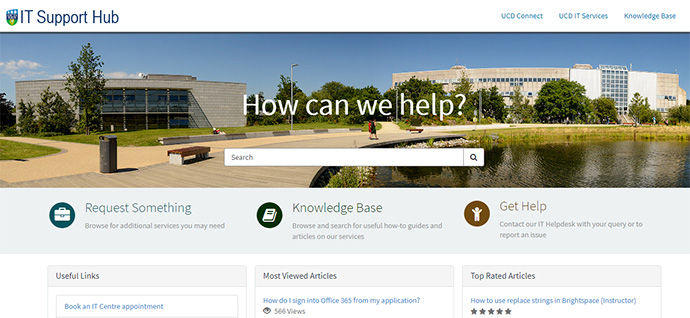
The UCD IT Support Hub is where you can log a call with our UCD IT Helpdesk team, find an answer in our Knowledge Base of articles, or request an additional service or access.
UCD IT Services
Computer Centre, University College Dublin, Belfield, Dublin 4, Ireland.Contact us via the UCD IT Support Hub: www.ucd.ie/ithelp